

MacBook Water Damage Repair
From $250
Just spilled liquid? DO NOT turn it on. DO NOT plug it in. DO NOT put it in rice. Leave it open, turn it upside down, and call us immediately.
For over 24 years, we have been at the forefront as Melbourne's premier Mac repairs specialist. Offering an affordable alternative to Apple's quoted prices, we take pride in delivering cost-effective solutions without compromising on quality. Customer satisfaction is at the heart of our operations, and we strive to exceed expectations in every repair we undertake. With our 'No Fix, No Fee' policy, you can rest assured that you only pay when we successfully restore your Mac to full functionality.
Same-Day Mac Repairs – Fast, Reliable, Professional!
Need your Mac fixed today? At IT-Tech Online, we offer expert same-day repair services for most Mac models. Whether it's a screen issue, battery problem, or software glitch, our certified technicians will have your device back up and running in just hours. We use only genuine Apple parts to ensure top-quality repairs. With transparent pricing and fast turnaround, you can trust us to get you back to work, school, or play without delay.
Visit us today or book your appointment now!
Stellar Customer Reviews
With 360 five-star Google reviews, our customers’ testimonials speak volumes about our service quality. These reviews detail real experiences, highlighting our ability to resolve issues effectively and efficiently.
Expert Leadership
Our technical team is led by a professional electronic engineer with a Master's in Computer Science. This expertise ensures that your Mac is in capable hands.
Advanced Repair Capabilities
Unlike many repair shops, we can fix Macs down to the electronic component (chip) level. This ability allows us to repair issues that Apple stores and other computer shops cannot, setting us apart from the competition.
Friendly and Knowledgeable Sales Team
Our sales team is not only friendly but also possesses excellent repair knowledge. They can quickly diagnose problems and provide accurate quotes over the phone, ensuring a smooth and efficient repair process.
High-Quality Parts
We use only the highest quality parts for repairs, ensuring the longevity and reliability of your Mac. Our commitment to quality means your device will perform like new.
No Fix, No Fee
If we can’t fix your Mac, you don’t pay. This policy reflects our confidence in our abilities and ensures you only pay for successful repairs.
MacBook Repair Specialist
in Melbourne
If you’ve spilled water on your MacBook and it’s no longer working, Apple may have given you a repair bill of $1000+ or even told you that the Mac is not repairable. But don’t worry! MacBook water damage is a common but very stressful issue. However, the fix is easier than you might think.
We are a Mac repair specialist in Melbourne with 25 years of experience repairing water-damaged MacBooks. We can fix your MacBook in 2 days for a fraction of Apple’s quoted price. Most water-damaged Mac laptops, be it a MacBook, MacBook Air, MacBook Pro, or MacBook Pro TouchBar, are absolutely salvageable.

How much does the MacBook water damage repair cost?
Liquid or water-damaged MacBooks can be professionally repaired at a reasonable cost. Most customers leave our store paying between $250-$800, depending on their problem and the MacBook model.
The degree of damage depends on how you handle the liquid spill. If you switch the MacBook off immediately after the spill and NEVER turn it on again, you pretty much guarantee your beloved MacBook is repairable and at a much lower cost. Severe damage happens at the moment you turn on a liquid-damaged and then dried MacBook.
After receiving your MacBook, we will perform a diagnostic assessment. We will let you know what has been liquid-damaged and how much it costs to repair or replace. For customers who use our postal service, we inform you which component(s) most likely have been damaged and the faulty component(s) costs before you post the MacBook to us.
Is my data safe on a water-damaged MacBook?
Yes, in most cases. From our experience of repairing hundreds of water-damaged MacBooks every year, the components being damaged from likely to unlikely are in this order: logic board, keyboard, touchpad, battery, screen, and hard drive. So your data is quite safe as long as it is in a removable hard drive, be it an SSD or a conventional spinning hard drive.
Since 2015, Apple started to integrate (solder) the SSD chips onto the logic board. This new design makes Mac data recovery much harder. We provide Mac data recovery on MacBook Pro TouchBar models from 2016-2017.
We can recover the data in the SSD chips via the emergency port known as “lifeboat”. Apple removes the “lifeboat” port and encrypts the data with the Apple T2 Security Chip in all 2018 models onwards. For those MacBooks, the only way to recover the data is to repair the logic board and make the MacBook at least temporarily working. If the logic board is not repairable, the data will be definitely gone.
Customer Reviews
We are very proud of our 300+ Five-star rating on Google Reviews, and we always work hard to maintain the top rating by providing excellent services to every customer. Before making a repair decision, please check out what our customers said on the Google Reviews besides:
 Richie BlackThis is a somewhat late review. I took my Macbook Pro in for repair after being told by another store that it would be better to replace my mac, sighting water damage and not fixable. IT-Tech Online were amazing, they saved my Macbook. It is now working great again. Also the price was very affordable. I'm very happy with the outcome and can not recommend them highly enough. Review being typed on the repaired Macbook. Thank you so much.Read MoreRead Less
 HoonThey were able to save all of my data from a severely water damaged MacBook Air when I was told my data js unsalvageable by other repair shops. Truely amazing work and I can confidently say this is the best place to get your MacBook fixed in MelbourneRead MoreRead LessJennifer DoumasI highly recommend IT - Tech Online for repairs. I had a lot of water spilled all over my brand new $2000 Mac book. I went to apple and they said the repair would end up costing as much as I bought it as they would have to repair almost all parts inside. They recommended purchasing a brand new laptop. The laptop did not turn on and the entire keyboard was wet. I was so upset but then I found IT Tech and spoke to Frances who reassured me they could fix it after having a look at it. The repair was a very reasonable price. They did an amazing job and the laptop is still in perfect condition 5 months on. Thank you for your support!Read MoreRead Less
- Michael Aldridgecommunication and service was outstanding, I sent my water damaged MacBook from interstate .It was fixed and on its way back to me a day after it was received. My Macbook was fixed with all data intact for less than half the price my local auth. Mac dealer quotedRead MoreRead LessKay HFantastic service! Very happy with the repairs completed - was able to repair dead MacBook screen (water damage) without having to replace entire screen to save on repair costs. So grateful!Read MoreRead LessH DHad a water damaged MacBook Pro which wouldn't boot. Opened it up myself to confirm there was water corrosion. Apple quoted about $3k to 'repair' it (replace the logic board, screen, keyboard, and pretty much the rest of the guts ... not actually investigate the technical problem, like a shorted chip, and replace that). I'm a bit dubious when it comes to 3rd party repair stores as I've seen some average quality repairs of friends old phones and usage of non genuine Apple parts. Did a lot of searching online for a MacBook repair place and came across here. About 350 5 star reviews seemed too good to be true, but from reading many of them, they looked all legitimate. Many of who also had water damage. Called up and spoke to Frances. She was extremely friendly and transparent about their repair process and potential costs involved. Decided to bring it in and within 24 hours it was repaired at 1/3rd of the cost that Apple quoted me. One month later the laptop is still operating perfectly. I don't often give reviews but the customer service, pricing and quality of workmanship was faultless. Many thanks! P.S - to get some insight into the kind and quality of repairing they do, have a look at Louis Rossmann on YouTube. He's an electronics technician in NYC who videos and narrates his repair processes. This includes water damaged MacBook ProsRead MoreRead Less
- Emily ChinHighly recommended! Water Damaged MacBook Pro 2021 M1 chip fixed within two days with affordable price 🙂 !!! I brought my MacBook Pro to Apple Store and repair shop in Melbourne. However, most of them suggested to change to a new one especially the logic board is pretty much damaged by liquid. Frances team had certified and professional engineer that helped me to changed the logic board and screen sensor. Appreciated the engineer never give spirit! Everything solved like a magic! I saved so much (still a university student). Thank you~Read MoreRead LessH DHad a water damaged MacBook Pro which wouldn't boot.
Opened it up myself to confirm there was water corrosion.
Apple quoted about $3k to 'repair' it (replace the logic board, screen, keyboard, and pretty much the rest of the guts ... not actually investigate the technical problem, like a shorted chip, and replace that).
I'm a bit dubious when it comes to 3rd party repair stores as I've seen some average quality repairs of friends old phones and usage of non genuine Apple parts.
Did a lot of searching online for a MacBook repair place and came across here.
About 350 5 star reviews seemed too good to be true, but from reading many of them, they looked all legitimate. Many of who also had water damage.
Called up and spoke to Frances. She was extremely friendly and transparent about their repair process and potential costs involved.
Decided to bring it in and within 24 hours it was repaired at 1/3rd of the cost that Apple quoted me.
One month later the laptop is still operating perfectly.
I don't often give reviews but the customer service, pricing and quality of workmanship was faultless. Many thanks!
P.S - to get some insight into the kind and quality of repairing they do, have a look at Louis Rossmann on YouTube. He's an electronics technician in NYC who videos and narrates his repair processes. This includes water damaged MacBook ProsRead MoreRead LessChangaccinoAfter getting quoted $1300 from apple and $850 from another independent repair shop to get my water damaged MBA fixed,I took it to frances at IT-TECH and it was fixed for $480. Other stores blatantly lied about undamaged parts being damaged to get more money out of it. So glad I found this shop, thank youRead MoreRead Less - HoosenI am VERY happy with IT-Tech. THANK YOU FRANCES AND YOUR ARMY OF MACBOOK DOCTORS. YOU SAVED MY BABY FROM WATER DAMAGE!! 😂😂😂😂 Fast turnaround, good prices, pretty much the best mates in town if you need your Mac fixed. I know who to go to if I have any more issues. Cheers guysRead MoreRead LessPilot PatchMy 2019 Macbook Pro suffered water damage and after receiving an estimate from another repairer to fix it the estimate was more than the purchase price so i thought it was gone. IT-Tech Online fixed it within 3 days and as good as new. Its unbelieveable could save my Macbook and it cost me 1/4 of the purchase price. I'll be back to them in future and telling anyone with IT problems to visit IT-Tech Online.Read MoreRead LessSew VintageIf you need your computer repaired this is the place to go! From the moment Francis called me after I put in my online inquiry I felt at ease and was told what to do before bringing in my computer, and a quick run down guide on a pricing quote. I still can't believe how quick the water damage was repaired on my brand new MacBook. Francis you are a lifesaver, her kindness and contagious laughter definitely helped as I was so stressed about my cat spilling water on it during my final uni assessments. 11/10 in my books! I can't stop telling you Thank you! <3Read MoreRead Less
- Claire MilneFrances was amazing. All hope was lost after spilling water into my laptop. Apple said there was nothing that could be done and offered to recycle my old and supposedly laptop and offered a new one, at full price of course. Not one to give up easily I found Frances and upon arrival she seemed 100% confident she could fit it. 48 hours later laptop was totally fixed, all data there it was as if the spill never happened and at 420$ it was a hellva lot cheaper than buying a new laptop. I couldn't believe it! Any Mac issues go to Frances, especially water damage she is a magic worker. THANK YOU SO MUCH XRead MoreRead LessJanith OshadhaWent there last week to get my water damaged MacBook repaired. Cost was really fair and the service was professional beyond expectations guys. My MacBook was fixed on the same day within hours which is really helpful and more importantly impressive! Keep up the good work 😉Read MoreRead LessLiam See7 anxious days after I spilled a whole glass of water on my laptop, here's what I now know I should have done: 1 - DON'T put it in rice. Turn it off RIGHT away, dry as much as possible with is facing upside down. DO NOT try turning it on again. Leave it butterflied open and upside down on a pillow to dry. Don't touch it. 2 - DON'T bother taking it to Apple unless you have Apple Care (which I now wish I paid for when I bought the laptop). They couldn't do anything and I'd have to buy a whole new laptop and lose all data. 3 - TAKE IT STRAIGHT TO FRANCES. It was badly water damaged so it was more expensive to fix ($1200) but worth it to not lose my hard drive and be able to use it again for work. She fixed it in 48 hours and its working again WITH ALL MY DATA SAVED. Thanks for your amazing work Frances.Read MoreRead Less
- Sew VintageIf you need your computer repaired this is the place to go! From the moment Francis called me after I put in my online inquiry I felt at ease and was told what to do before bringing in my computer, and a quick run down guide on a pricing quote. I still can't believe how quick the water damage was repaired on my brand new MacBook. Francis you are a lifesaver, her kindness and contagious laughter definitely helped as I was so stressed about my cat spilling water on it during my final uni assessments. 11/10 in my books! I can't stop telling you Thank you!Read MoreRead LessMakayla Sew VintageIf you need your computer repaired this is the place to go! From the moment Francis called me after I put in my online inquiry I felt at ease and was told what to do before bringing in my computer, and a quick run down guide on a pricing quote. I still can't believe how quick the water damage was repaired on my brand new MacBook. Francis you are a lifesaver, her kindness and contagious laughter definitely helped as I was so stressed about my cat spilling water on it during my final uni assessments. 11/10 in my books! I can't stop telling you Thank you! <3Read MoreRead LessskybellyFrances is a miracle worker/angel/my new favourite person! I spilled water all over my Macbook Pro 2016 - and not just a little, I knocked over a whole glass straight on to the keyboard/speakers/touch bar. After freaking out for 24 hours (and letting it air dry - don’t put it in rice!!) I found out about Frances and gave her a buzz. Apple wanted $100 just to give me a quote on the damage - and let’s face it, they would’ve either said it was unfixable or quoted me a ridiculous price. Frances gave me a break down of what it would cost to fix it, depending on which parts were damaged (between $600-1200). For $850 she had it back to me the next day with all my data intact! Apple could never!! She repaired the logic board and replaced the touch pad. I cannot believe how lucky I am, I recommend her to everyone! Best service ever!Read MoreRead Less


MacBook Water Damage Repair Process
Water damage is one of the most common causes of MacBook failure. The consequences can range from mild keyboard malfunctions to catastrophic damage, such as CPU destruction or burned holes in the motherboard. To give your device the best chance of survival, we follow a rigorous, step-by-step restoration process:
Complete Disassembly & Component Care: A junior technician completely disassembles your MacBook. Peripheral components—including the screen, case, keyboard, touchpad, and battery—are carefully hand-cleaned, tested, and either repaired or replaced depending on the severity of the damage.
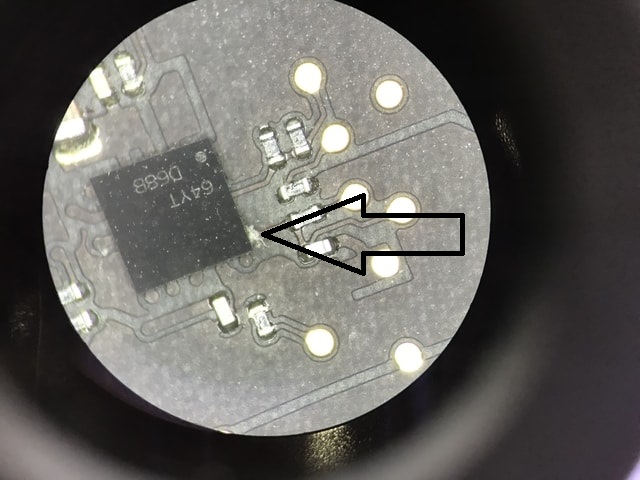
Advanced Logic Board Diagnostics: A specialized technician with micro-soldering skills inspects the logic board and SSD under a microscope to identify burned or corroded chips. Because some damage isn’t visible even under magnification, we utilize advanced diagnostic equipment and Apple schematic diagrams to troubleshoot and pinpoint hidden faults.
Precision Repair & Ultrasonic Cleaning: All faulty and corroded chips are expertly replaced. The logic board is then submerged in an electronics-friendly solution inside an ultrasonic cleaner for an intensive, deep clean. Afterward, the board is safely baked in an oven at approximately 100°C for a few minutes to ensure it is completely dry.
Bench Testing & Final Reassembly: The logic board is powered up and rigorously evaluated on a test bench. Once it passes this phase, all parts are reassembled into the MacBook case, and the complete unit undergoes a final, comprehensive system test to ensure everything is working flawlessly.
Real-World Liquid Damage Recovery Examples
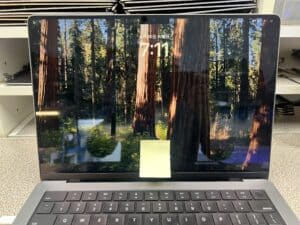
820-02098 No Backlight Repair – UP800 & QP800-QP803 Replaced
Detailed board-repair case for a 2021 14-inch MacBook Pro A2442 with 820-02098 logic board, water damage and no backlight. Replacing UP800 restored backlight only temporarily; QP803 later failed short, and the final fix was replacing all four LUXE MOSFETs QP800-QP803 as a set.
Contact us and Get a Free Quote
Our expertise spans a wide range of Mac devices, including MacBook Air, MacBook Pro, iMac, Mac Mini, and Mac Pro. Our comprehensive suite of Mac computer services.
How Fully Test the MacBook?
If the board failed to pass the test, it will be passed to an experienced engineer. The engineer will identify and replace the remaining faulty chips which a microscope could not spot.
The engineer may use a multimeter, oscilloscope and logic analyzer to conduct comprehensive measurements to pinpoint the faulty chips among the many thousands on the logic board.
The availability of Apple’s logic board schematic (electronic diagrams) will significantly increase troubleshooting productivity, sometimes is vital to determining the success or failure of the repair.
All the parts will be assembled back to the case. We will fully test the MacBook with the ASD (Apple Service Diagnostic) and other third-party testing software.
Spilt water on your Mac? No worries, get your water-damaged MacBook repaired today before it rusts away.
Contact us along with your MacBook model and fault description. Our experienced staff will call you to discuss your options based on your current situation.
MacBook Water Damage FAQs
Question 1: What should I do immediately after spilling water on my MacBook?
Answer: Instantly turn off the MacBook by holding the power button. Unplug the charger and any accessories. Do not try to turn it back on. Open the lid, place the MacBook upside down on a towel to let gravity drain the liquid, and bring it to a professional repair center immediately.
Question 2: Does putting a water-damaged MacBook in rice work?
Answer: No. Putting a MacBook in rice is a myth and actually causes more damage. Rice cannot absorb moisture from inside the logic board casing, and the starch and dust from the rice accelerate corrosion on the internal microchips.
Question 3: Will I lose my data if I spilled liquid on my Mac?
Answer: If you take it to the Apple Store, they will usually quote a full logic board replacement, which means your data is lost. Because we specialize in repairing the exact water-damaged components on your original logic board, we can usually save your MacBook and keep all your data perfectly intact.
Question 4: Can a liquid-damaged MacBook be fixed if it won’t turn on?
Answer: Yes. A dead MacBook usually means the liquid has shorted the power rail on the logic board. Using advanced micro-soldering and ultrasonic cleaning, we can find the specific burnt chips, replace them, and bring the completely dead logic board back to life.
Question 5: How much does MacBook water damage repair cost?
Answer: Because every spill is different, costs vary based on what was damaged (e.g., keyboard, trackpad, or logic board). However, our chip-level logic board repairs typically cost a fraction of what Apple charges for a full replacement, saving you hundreds of dollars.
Recent repair case: 14-inch MacBook Pro water damage with no backlight
We recently repaired a 14-inch MacBook Pro that had water damage and no backlight after Apple recommended replacing the logic board. Our board-level repair restored the MacBook to full working condition.
Read the full repair case study: 14-Inch MacBook Pro Water Damage Repair – No Backlight Fixed