MacBook Pro A2442 Shuts Down After Correct Password — 820-02098 R5843 Repair
Repair Overview
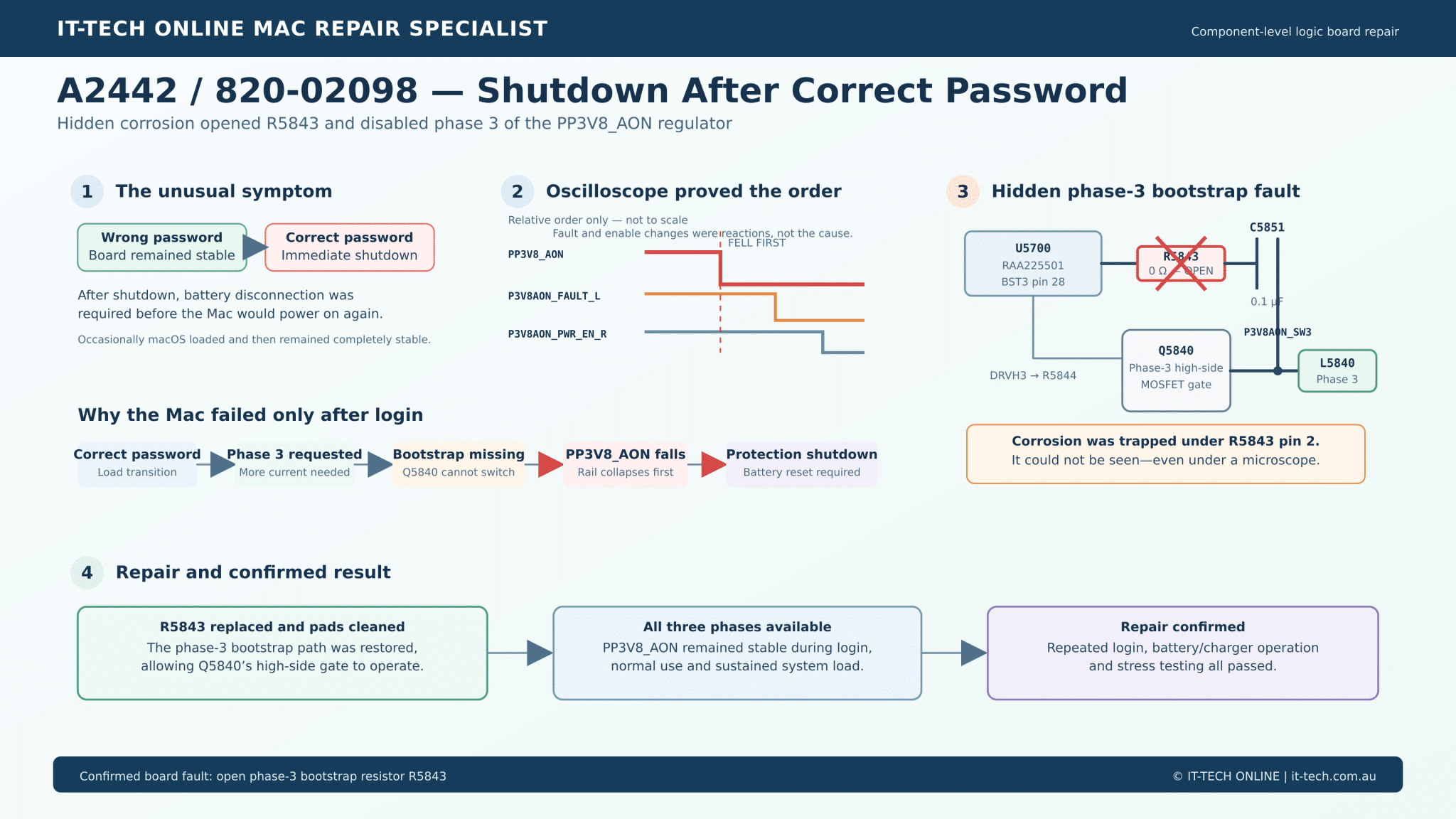
This 14-inch MacBook Pro A2442 could start normally and reach the login screen. It remained stable when an incorrect password was entered, but entering the correct password usually caused an immediate shutdown.
After shutting down, the Mac would not power on again until the battery was disconnected. Occasionally it completed the login successfully, and when that happened, it could run normally.
The symptom initially looked like a macOS, FileVault or SSD problem. However, oscilloscope testing proved that the main 3.8 V always-on power rail, PP3V8_AON, collapsed before the logic board issued a shutdown command.
The confirmed cause was microscopic corrosion hidden underneath R5843, a 0 Ω resistor in the third phase of the PP3V8_AON regulator. The resistor had become open circuit, disabling the phase-3 bootstrap supply and preventing Q5840’s high-side MOSFET from operating correctly.
R5843 was replaced and the damaged area was cleaned. The Mac then passed repeated login tests, normal functional checks and sustained stress testing.
This repair restored the original logic board without requiring logic-board replacement.
Repair details
- Device: 14-inch MacBook Pro
- Model: A2442
- Processor: Apple M1 Pro
- Logic board: 820-02098
- Primary symptom: Shutdown immediately after entering the correct password
- Additional symptom: Would not restart until the battery was disconnected
- Failed rail:
PP3V8_AON - Confirmed fault: Open R5843 caused by hidden corrosion
- Repair: Cleaned the affected pads and replaced R5843
- Result: Login, normal operation and stress testing passed

The unusual login-dependent symptom
The Mac could reach the login screen consistently.
Four deliberately incorrect password attempts did not cause any instability. The board remained powered and continued waiting at the login screen.
The shutdown was triggered only after the correct password was accepted. This was an important diagnostic clue because successful authentication produces a significant transition in system activity. The encrypted data volume may be unlocked, macOS continues loading, NAND activity increases and additional SoC functions become active.
The board occasionally survived this transition. Once macOS loaded successfully, the Mac could remain stable and pass normal tests. This indicated a load-dependent or transient power problem rather than a permanent short circuit.

Post-shutdown power measurements
The following measurements were taken after the board entered its latched-off state.
| Test condition | PP3V8_AON | PPVBAT_AON | PPBUS_AON | Additional observations |
|---|---|---|---|---|
| Battery only | 0 V | 0 V | 0 V | Battery disconnection required to reset the board |
| Battery and charger | 0 V | 0 V | 12.3 V | PPDCIN_AON remained at 5 V; USB-C meter showed 5 V and 0 A |
With the charger connected, PPBUS_AON remained at 12.3 V while PP3V8_AON was at 0 V. This proved that the charger and main PPBUS generation circuit remained operational after the shutdown.
The loss of PPVBAT_AON was a consequence of the failed 3.8 V rail. When PP3V8_AON disappeared, Q5155 opened and disconnected the battery path. On battery power alone, this also removed the source for PPBUS_AON.
The USB-C reading returning to 5 V and 0 A was another consequence of the always-on system shutting down. It did not prove that the original fault was in the USB-C charging circuit.
U2230 was investigated and ruled out
A very small amount of contamination and corrosion was found around U2230.
U2230 is a 74AVC2T45 level shifter in the AOP sensor SPI circuit. It translates the SoC-side 1.2 V clock and MOSI signals to the 1.8 V domain used by the IMU and lid-angle sensor branches.
The chip and its surrounding resistors were checked. U2230 was also replaced as a precaution, but the shutdown symptom remained completely unchanged.
This ruled out U2230 as the cause and returned the investigation to the main power sequence.
Oscilloscope testing found the initiating event
The following signals were captured during the correct-password shutdown:
PP3V8_AONP3V8AON_PWR_EN_RP3V8AON_FAULT_LPPVIN_P3V8AON_ISNS
The relative order was decisive:
PP3V8_AONdropped first.P3V8AON_FAULT_Lchanged afterward.P3V8AON_PWR_EN_Rwas removed afterward.- The regulator input path changed later.
This proved that the SoC was not deliberately commanding the first shutdown event. U5700 was still enabled and had input power when its output started collapsing.
The later fault and enable changes were protection responses to the lost 3.8 V rail.
How the PP3V8_AON regulator works
U5700 is an RAA225501 three-phase voltage-regulator controller. It produces the high-current PP3V8_AON rail using three switching phases.
The three external phase circuits include:
- Phase 1: Q5800 and L5800
- Phase 2: Q5820 and L5820
- Phase 3: Q5840 and L5840
At lighter loads, the regulator can operate without requiring the full capacity of all three phases. During a rapid load increase, additional phase capacity is required to keep PP3V8_AON stable.
This explains why the board could remain at the login screen and why it sometimes completed login successfully.
The hidden R5843 fault
R5843 is a 0 Ω resistor in the phase-3 bootstrap circuit:
U5700 BST3 pin 28 → R5843 → C5851 → P3V8AON_SW3
C5851 is the 0.1 µF bootstrap capacitor. It provides the floating supply required for U5700 to drive Q5840’s high-side MOSFET gate above the phase-3 switch-node voltage.
R5843 was electrically open.
After removing R5843, a very small amount of corrosion was discovered underneath pin 2. The corrosion was trapped between the resistor and its pad, making it impossible to see during an ordinary visual inspection—even under a microscope.
With R5843 open:
- The phase-3 bootstrap capacitor could not operate correctly.
- Q5840’s high-side MOSFET could not be driven normally.
- Phase 3 could not contribute its required current.
- The post-login load transition caused
PP3V8_AONto collapse. - U5700 subsequently asserted its fault output.
- The SoC removed the regulator enable.
- Q5155 opened and disconnected the battery path.
- The board remained latched off until the battery was disconnected.
This sequence matched every measured symptom.
The repair
R5843 was removed and the corrosion underneath it was cleaned.
The pads and surrounding phase-3 bootstrap connections were checked, including continuity between:
- U5700’s
P3V8AON_BST3output and R5843 - R5843 and C5851
- C5851 and
P3V8AON_SW3 - U5700’s
P3V8AON_DRVH3path through R5844 to Q5840
A new 0 Ω R5843 resistor was installed.
This restored the phase-3 bootstrap circuit and allowed Q5840’s high-side gate driver to operate correctly.
Confirmed repair result
After replacing R5843:
- The correct password could be entered repeatedly without shutdown.
- macOS loaded normally.
- The Mac no longer required battery disconnection to restart.
PP3V8_AONremained stable through the login transition.- Normal functional testing passed.
- Sustained stress testing passed.
The repair confirmed that the open R5843—not macOS, the user password, U2230 or a permanent NAND fault—was the cause of the original shutdown.
A separate DFU error 4041 finding
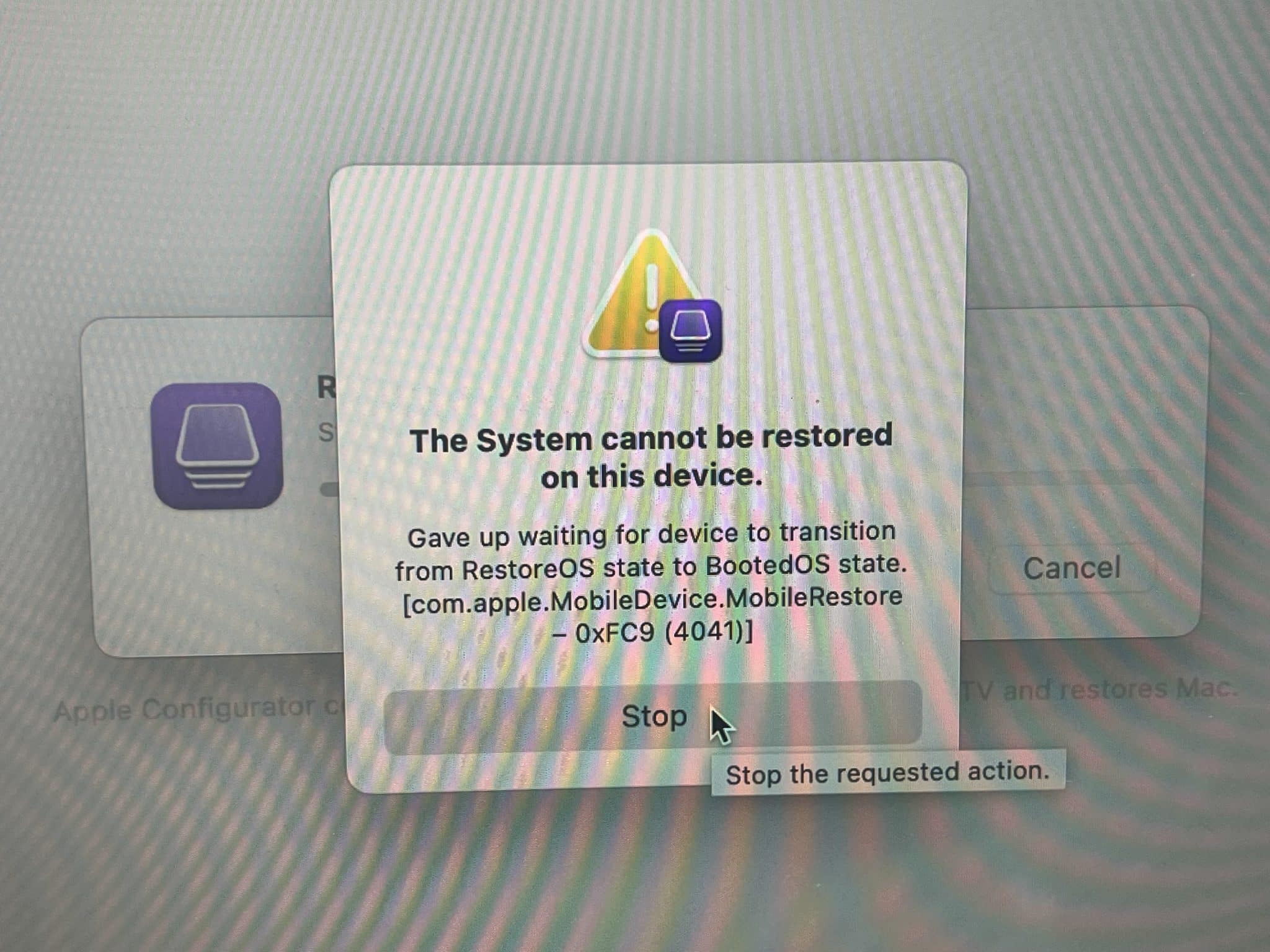
After the board repair, the Mac still produced error 4041 when a DFU revive or restore was attempted.
However, the target Mac displayed the Apple logo, restarted several times, entered normal macOS Recovery, requested the owner password for activation and then booted macOS successfully. The host Mac remained incorrectly displayed in DFU mode and reported error 4041 approximately ten minutes later.
The host Mac was running macOS 13. Apple’s current firmware revive and restore requirements specify a host Mac running macOS 14 or later.
This makes the DFU 4041 result a separate host-software compatibility issue rather than evidence that the repaired logic board was still shutting down.

Why this case matters
A MacBook that shuts down after the correct password can easily be mistaken for a software, FileVault or SSD problem.
In this case, the password was only the trigger for a higher-load power transition. The real fault was a physically tiny, visually hidden open resistor in one phase of a three-phase regulator.
Successful component-level diagnosis depended on:
- Reproducing the exact trigger
- Comparing incorrect-password and correct-password behaviour
- Measuring the shutdown state
- Finding the earliest falling rail
- Comparing the rail failure against enable and fault timing
- Checking the individual switching-phase components
- Electrically testing components that looked normal under magnification
IT-Tech Online specialises in component-level MacBook logic-board diagnosis and repair, including intermittent no-power faults, corrosion damage, power-sequence failures and data-preserving board repair.
Melbourne customers can visit our workshop, and interstate customers can use our Australia-wide mail-in repair service.
If you are interested in the deeper diagnostic side of Mac repair, we have more real logic board fault cases documented here:
Mac Logic Board Repair Case Studies
Need Board-Level Mac Repair?
We specialise in MacBook water damage repair, logic board repair, dead logic board data recovery , and component-level diagnostics.