



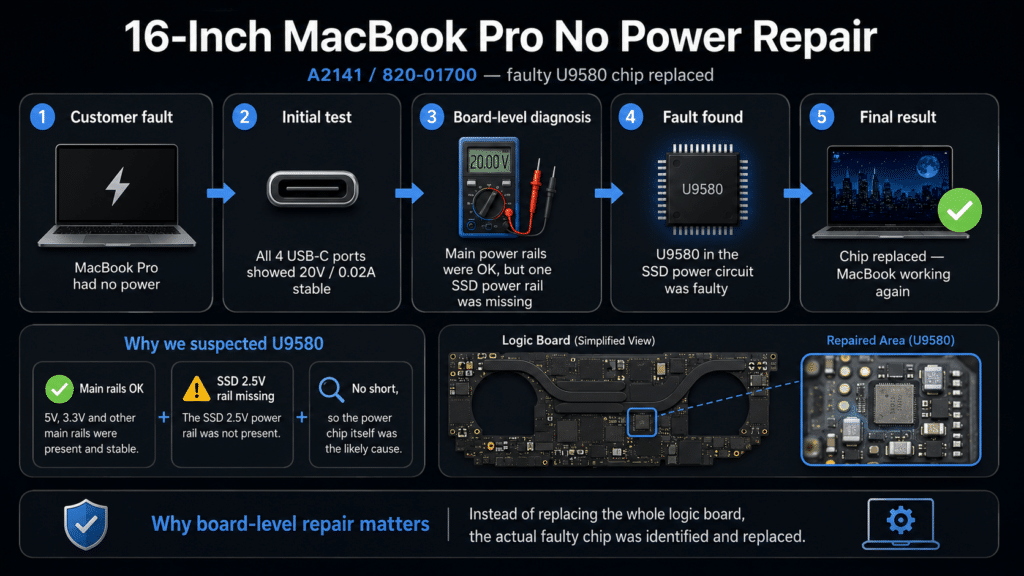
This 16-inch MacBook Pro A2141 came in with a no power fault. The customer reported that the MacBook would not start.
When we tested the USB-C ports, the charger was detected, but the MacBook still did not boot normally. That told us the problem was not simply a charger or cable issue.
This MacBook was able to take power from the charger, but it was not starting properly.
We checked the main power rails first. The main power line and early startup rails were present, which meant the fault was further into the startup sequence.
Further testing showed that one SSD-related power line was missing:
PP2V5_NAND_SSD0 = 0VThere was no short on that line, and the signal telling the chip to turn on was present. This meant the small chip responsible for creating that power rail was the likely cause.
The faulty chip was U9580, which is part of the SSD power circuit on the logic board.
After replacing U9580, the missing SSD power line returned and the MacBook powered on normally.
This is a good example of a board-level fault where the whole logic board did not need to be replaced. The issue was traced to one failed component.
A MacBook with “no power” does not always mean the main board is completely dead. Sometimes the charger is working and the first power rails are present, but one small power circuit prevents the machine from starting.
In this case, the MacBook needed detailed board-level diagnosis. By testing the power sequence step by step, we found the actual faulty chip and repaired the original logic board.
After replacing the faulty U9580 chip:
This repair is one of many real Mac repair cases completed by IT-Tech Online. You can view more examples of successful MacBook, iMac, liquid damage, no-power and screen repair jobs here:
Successful Mac Repair Cases
If your MacBook does not power on, stays at very low charging current, or shows no signs of startup, the fault may be on the logic board.
IT-Tech Online provides professional MacBook logic board repair in Melbourne, including no-power faults, charging faults, SSD power issues and water-damaged boards.
Call (03) 9563 8588 for advice before replacing the whole logic board.